AWS Service - ASG
I currently work
ASG
What’s an Auto Scaling Group?
In real-life, the load on your websites and application can change
In the cloud, you can create and get rid of servers very quickly
The goal of an Auto Scaling Group (ASG) is to:
Scale out (add EC2 instances) to match an increased load
Scale in (remove EC2 instances) to match a decreased load
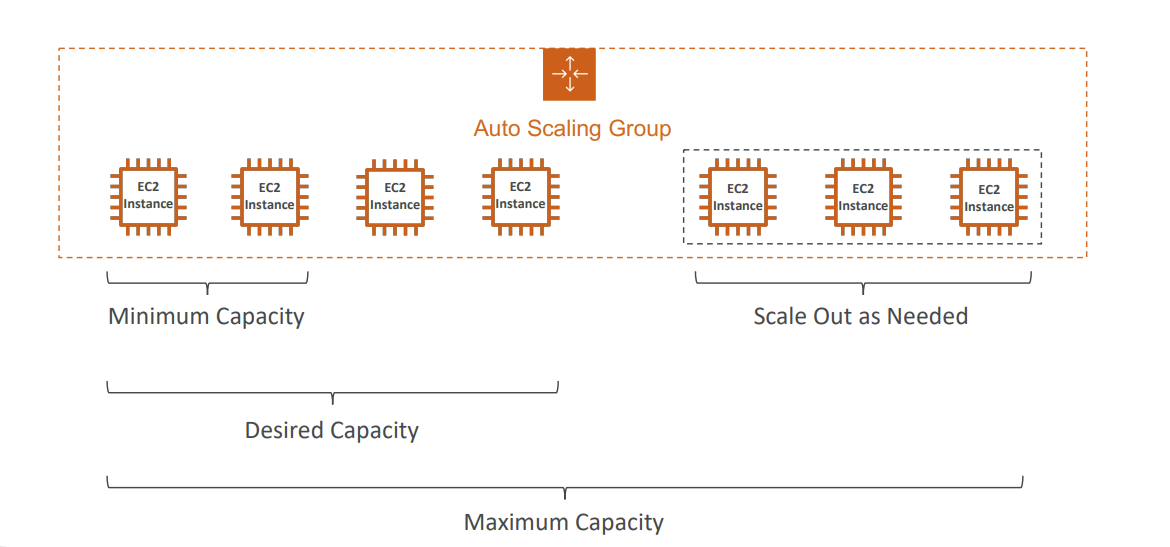
Ensure we have a minimum and a maximum number of EC2 instances running
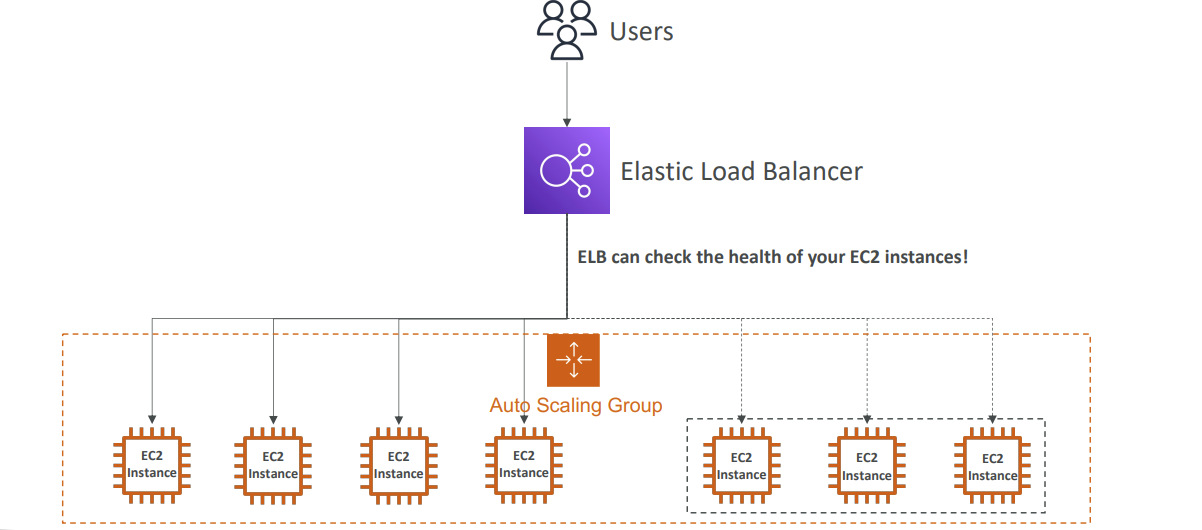
Automatically register new instances to a load balancer
Re-create an EC2 instance in case a previous one is terminated (ex: if unhealthy)
ASG are free (you only pay for the underlying EC2 instances)
Auto Scaling Group in AWS
Auto Scaling Group in AWS With Load Balancer
Auto Scaling Group Attributes
Launch Template
AMI , Instance type
EC2 User Data
EBS Volumes
Security Groups
SSH Key Pair
IAM Role of EC2 instance
Subnet
Load Balancer
Min size, Max Size, Desired Capacity, Initial Capacity
Scaling Policies
Auto Scaling - CloudWatch Alarms & Scaling
It is possible to scale an ASG based on CloudWatch alarms
An alarm monitors a metric (such as Average CPU, or a custom metric)
Metrics such as Average CPU are computed for the overall ASG instances
Based on the alarm:
We can create scale out policies (increase the number of instances)
We can create scale in policies (decrease the number of instances)
Auto Scaling Groups - Dynamic Scaling Policies
Target Tracking Scaling
Most simple and easy to setup
Example: I want the average ASG CPU to stay at around 50%
Simple / Step Scaling
When a CloudWatch alarm is triggered (example CPU > 70%), then add 2 instance
When a CloudWatch alarm is triggered (example CPU < 30%), then remove 1 instance
Scheduled Actions
Anticipate a scaling based on known usage patterns
Example: increase the min capacity to 10 at 5 pm on Fridays
Auto Scaling Groups - Predictive Scaling
- Predictive scaling: continuously forecast load and schedule scaling ahead
Metrics to scale
CPUUtilization: Average CPU utilization across your instances
RequestCountPerTarget: to make sure the number of requests per EC2 instances is stable
Average Network In / Out (if you’re application is network bound)
Any custom metric (that you push using CloudWatch)
Auto Scaling Groups - Scaling Cooldowns
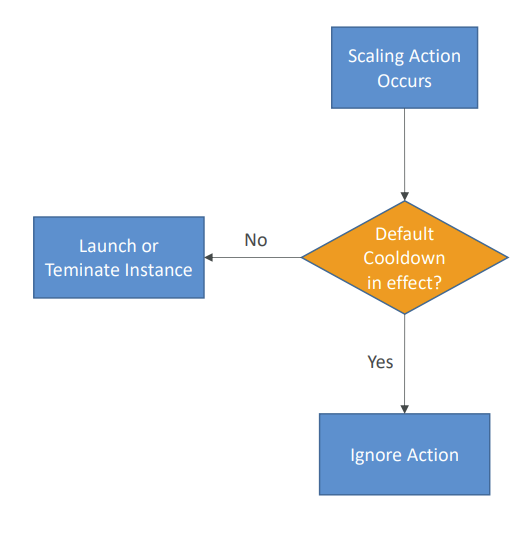
After a scaling activity happens, you are in the cooldown period (default 300 seconds)
During the cooldown period, the ASG will not launch or terminate additional instances (to allow for metrics to stabilize)
Advice: Use a ready-to-use AMI to reduce configuration time in order to be serving request fasters and reduce the cooldown period
Relevant Doc:
https://docs.aws.amazon.com/autoscaling/ec2/userguide/what-is-amazon-ec2-auto-scaling.html
Disclaimer: This is a personal blog that might come in handy when I suffer from Dementia in future.