AWS Service - DynamoDB
I currently work
DynamoDB
Overview
Fully managed, highly available with replication across multiple AZs
NoSQL database - not a relational database - with transaction support
Scales to massive workloads, distributed database
Millions of requests per seconds, trillions of row, 100s of TB of storage
Fast and consistent in performance (single-digit millisecond)
Integrated with IAM for security, authorization and administration
Low cost and auto-scaling capabilities
No maintenance or patching, always available
Standard & Infrequent Access (IA) Table Class
Introduction
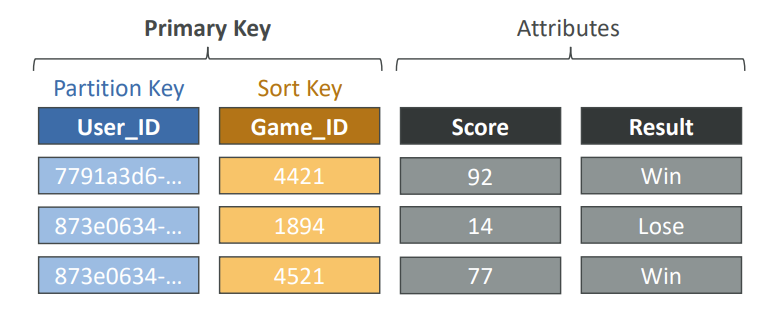
DynamoDB is made of Tables
Each table has a Primary Key (must be decided at creation time)
Each table can have an infinite number of items (rows)
Each item has attributes (can be added over time – can be null)
Maximum size of an item is 400KB
Data types supported are
Scalar Types - String, Number, Binary, Boolean, Null
Document Types - List, Map
Set Types - String Set, Number Set, Binary Set
Therefore, in DynamoDB you can rapidly evolve schemas
DynamoDB Capacity Modes
Control how you manage your table’s capacity (read/write throughput)
Provisioned Mode (default)
You specify the number of reads/writes per second
You need to plan capacity beforehand
Pay for provisioned Read Capacity Units (RCU) & Write Capacity Units (WCU)
Possibility to add auto-scaling mode for RCU & WCU
On-Demand Mode
Read/writes automatically scale up/down with your workloads
No capacity planning needed
Pay for what you use, more expensive ($$$)
Great for unpredictable workloads, steep sudden spikes
DynamoDB Accelerator (DAX)
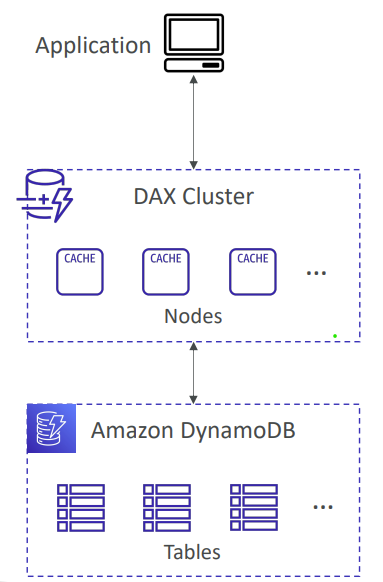
Fully-managed, highly available, seamless in-memory cache for DynamoDB
Help solve read congestion by caching
Microseconds latency for cached data
Doesn’t require application logic modification (compatible with existing DynamoDB APIs)
5 minutes TTL for cache (default)
DynamoDB Stream Processing
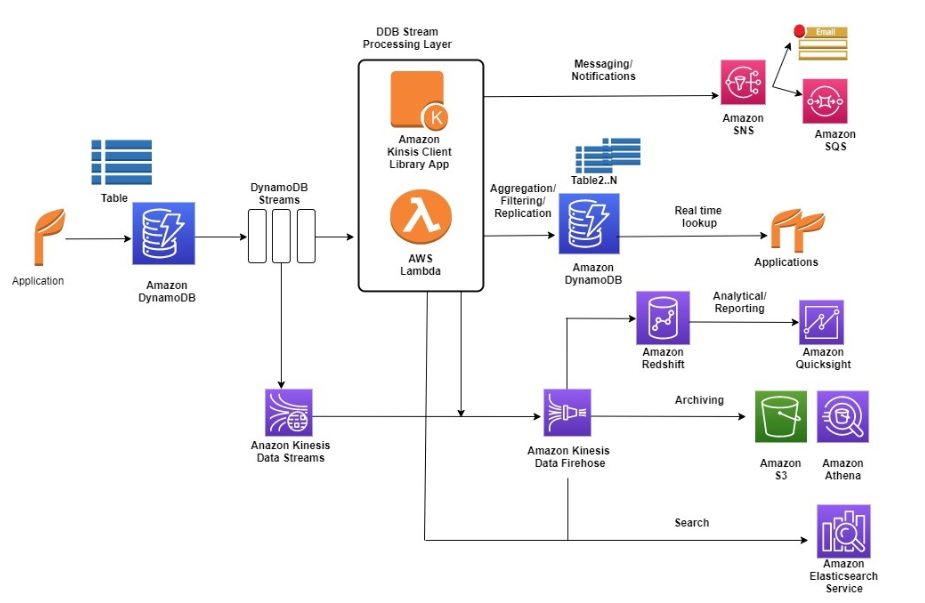
Ordered stream of item-level modifications (create/update/delete) in a table
Use cases
React to changes in real-time (welcome email to users)
Real-time usage analytics
Insert into derivative tables
Implement cross-region replication
Invoke AWS Lambda on changes to your DynamoDB table
DynamoDB Global Tables
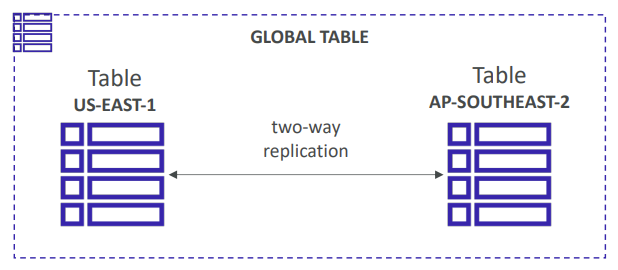
Make a DynamoDB table accessible with low latency in multiple-regions
Active-Active replication
Applications can READ and WRITE to the table in any region
Must enable DynamoDB Streams as a pre-requisite
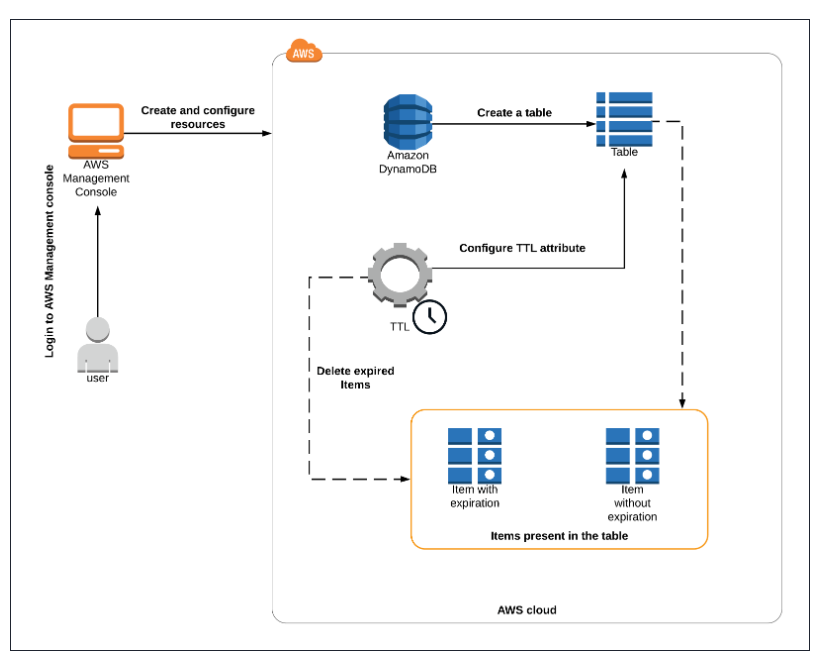
DynamoDB - Time To Live (TTL)
Automatically delete items after an expiry timestamp
Use cases: reduce stored data by keeping only current items, adhere to regulatory obligations, web session handling
DynamoDB Backups for disaster recovery
Continuous backups using point-in-time recovery (PITR)
Optionally enabled for the last 35 days
Point-in-time recovery to any time within the backup window
The recovery process creates a new table
On-demand backups
Full backups for long-term retention, until explicitely deleted
Doesn’t affect performance or latency
Can be configured and managed in AWS Backup (enables cross-region copy)
The recovery process creates a new table
DynamoDB Integration with Amazon S3
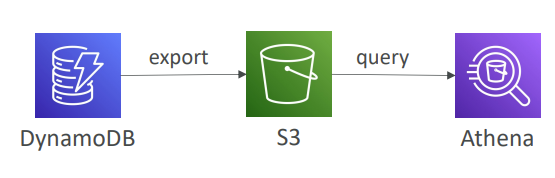
Export to S3 (must enable PITR)
Works for any point of time in the last 35 days
Doesn’t affect the read capacity of your table
Perform data analysis on top of DynamoDB
Retain snapshots for auditing
ETL on top of S3 data before importing back into DynamoDB
Export in DynamoDB JSON or ION format
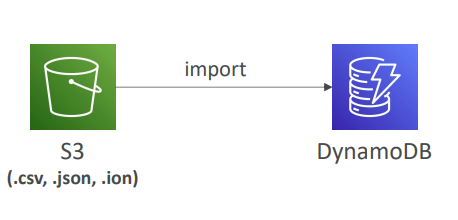
Import from S3
Import CSV, DynamoDB JSON or ION format
Doesn’t consume any write capacity
Creates a new table
Import errors are logged in CloudWatch Logs
Relevant Doc:
https://docs.aws.amazon.com/amazondynamodb/latest/developerguide/Introduction.html
Disclaimer: This is a personal blog that might come in handy when I suffer from Dementia in future.