AWS Service - Elastic Load Balancer
I currently work
Elastic Load Balancer
What is load balancing?
Load Balances are servers that forward traffic to multiple servers (e.g., EC2 instances) downstream
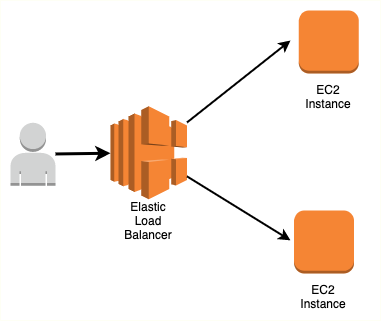
Why use a load balancer?
Spread load across multiple downstream instances
Expose a single point of access (DNS) to your application
Seamlessly handle failures of downstream instances
Do regular health checks to your instances
Provide SSL termination (HTTPS) for your websites
Enforce stickiness with cookies
High availability across zones
Separate public traffic from private traffic
Why use an Elastic Load Balancer?
An Elastic Load Balancer is a managed load balancer
AWS guarantees that it will be working
AWS takes care of upgrades, maintenance, high availability
AWS provides only a few configuration knobs
It costs less to setup your own load balancer but it will be a lot more effort on your end
It is integrated with many AWS offerings / services
EC2, EC2 ASG, Amazon ECS
ACM, CloudWatch, Route 53, WAF, AWS Global Accelerator
Health Checks
Health Checks are crucial for Load Balancers
They enable the load balancer to know if instances it forwards traffic to are available to reply to requests
The health check is done on a port and a route
If the response is not 200 (OK), then the instance is unhealthy
Types of load balancer on AWS
AWS has 4 kinds of managed Load Balancers
Classic Load Balancer (v1 - old generation) – 2009 – CLB
- HTTP, HTTPS, TCP, SSL (secure TCP)
Application Load Balancer (v2 - new generation) – 2016 – ALB
- HTTP, HTTPS, WebSocket
Network Load Balancer (v2 - new generation) – 2017 – NLB
- TCP, TLS (secure TCP), UDP
Gateway Load Balancer – 2020 – GWLB
- Operates at layer 3 (Network layer) – IP Protocol
It is recommended to use the newer generation load balancers as they provide more features
Some load balancers can be setup as internal (private) or external (public) ELBs
Load Balancer has security group using which you could control traffic at your downstream Instances to allow traffic only from ELB's SG

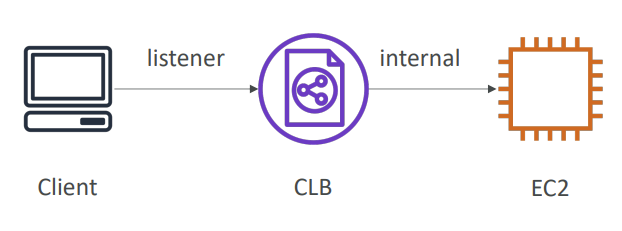
Classic Load Balancers (v1)
Supports TCP (Layer 4), HTTP & HTTPS (Layer 7)
Health checks are TCP or HTTP based
Fixed hostname
XXX.region.elb.amazonaws.com
Application Load Balancer (v2)
Application load balancers is Layer 7 (HTTP)
Load balancing to multiple HTTP applications across machines (through target groups)
Load balancing to multiple applications on the same machine (containers)
Support for HTTP/2 and WebSocket
Support redirects (from HTTP to HTTPS for example)
Routing tables to different target groups:
Routing based on path in URL (
example.com/users&example.com/orders)Routing based on hostname in URL (
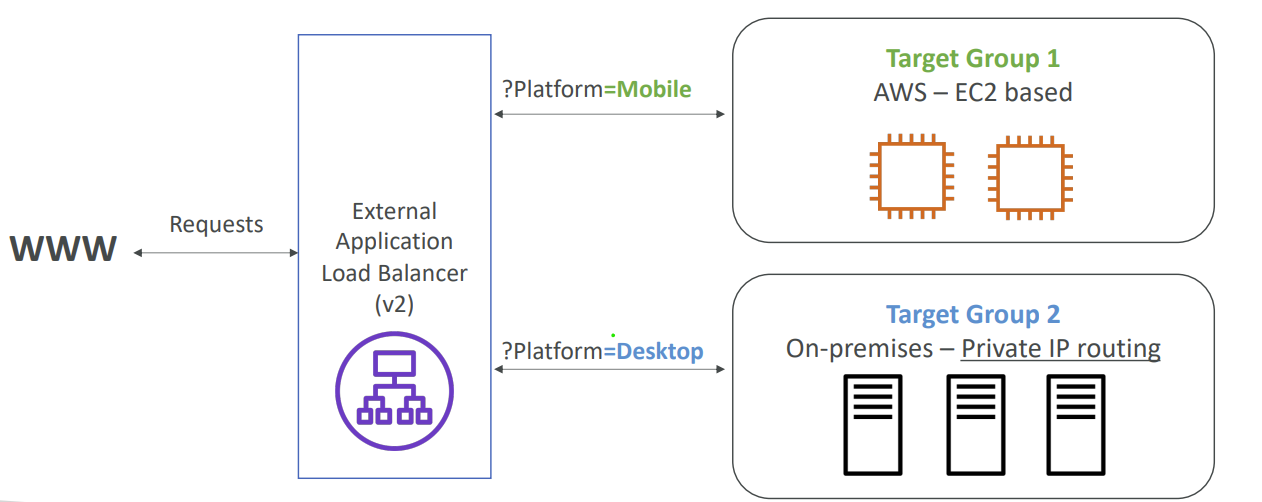
one.example.com&other.example.com)Routing based on Query String, Headers (
example.com/users?id=123&order=false)ALB are a great fit for micro services & container-based application (Docker; ECS; EKS)
Has a port mapping feature to redirect to a dynamic port in ECS
In comparison, we’d need multiple Classic Load Balancer per application
HTTP Based Traffic
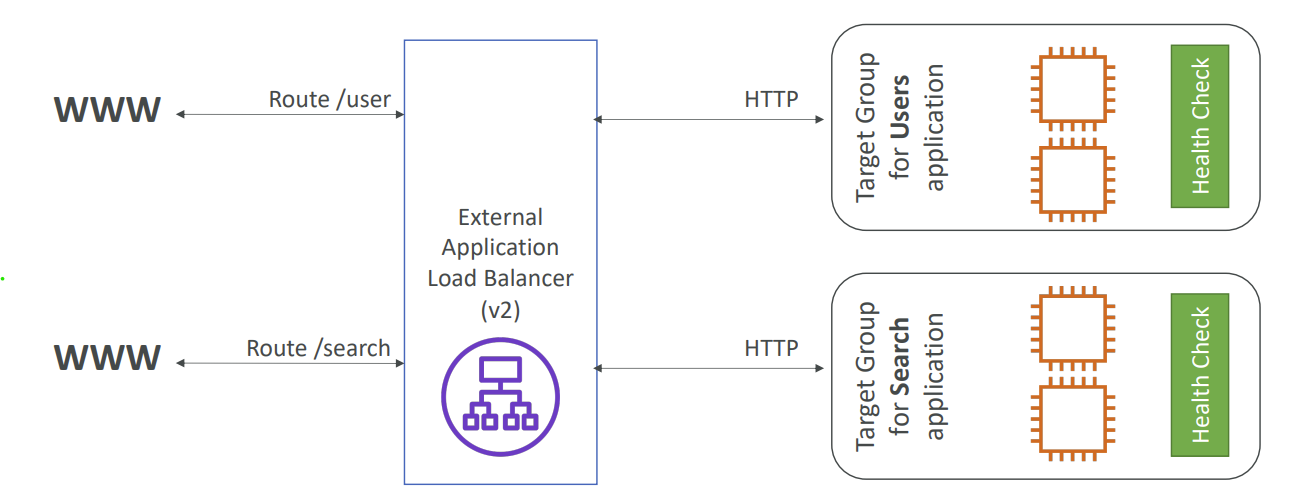
Target Groups
EC2 instances (can be managed by an Auto Scaling Group) - HTTP
ECS tasks (managed by ECS itself) - HTTP
Lambda functions - HTTP request is translated into a JSON event
IP Addresses - must be private IPs
ALB can route to multiple target groups
Health checks are at the target group level
Query Strings/Parameters Routing
Fixed hostname -
XXX.region.elb.amazonaws.comThe application servers don’t see the IP of the client directly
The true IP of the client is inserted in the header
X-Forwarded-ForWe can also get Port (X-Forwarded-Port) and proto (X-Forwarded-Proto)
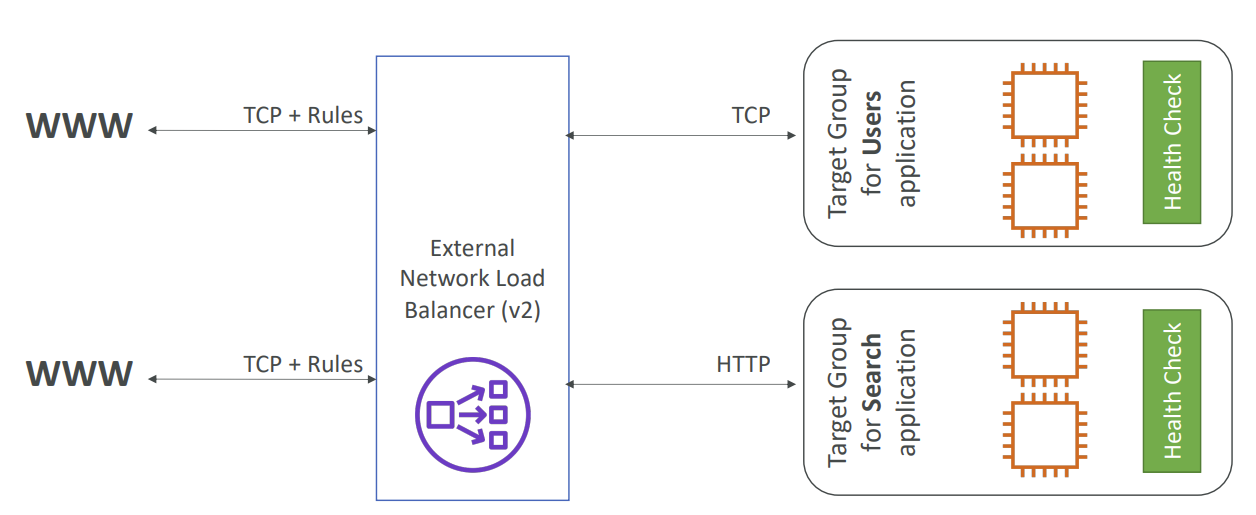
Network Load Balancer (v2)
Network load balancers (Layer 4) allow to:
Forward TCP & UDP traffic to your instances
Handle millions of request per seconds
Less latency - 100 ms (vs 400 ms for ALB)
NLB has one static IP per AZ, and supports assigning Elastic IP (helpful for whitelisting specific IP)
NLB are used for extreme performance, TCP or UDP traffic
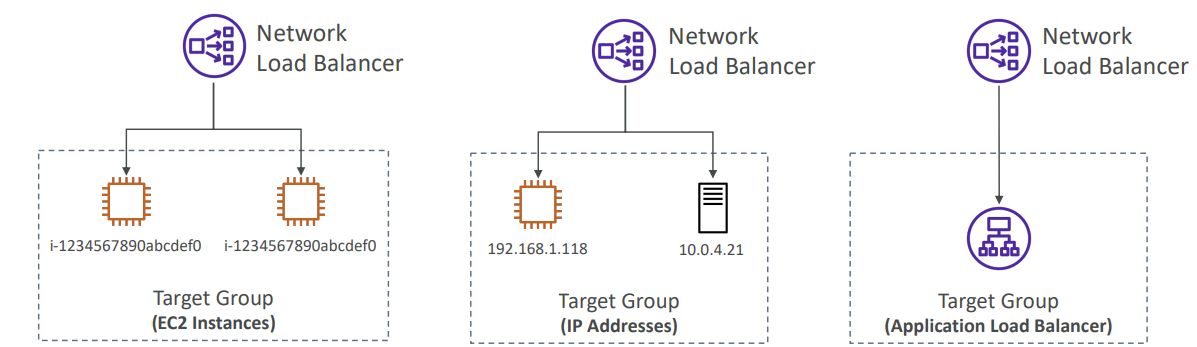
Network Load Balancer –Target Groups
EC2 instances
IP Addresses – must be private IPs
Application Load Balancer
Health Checks support the TCP, HTTP and HTTPS Protocols
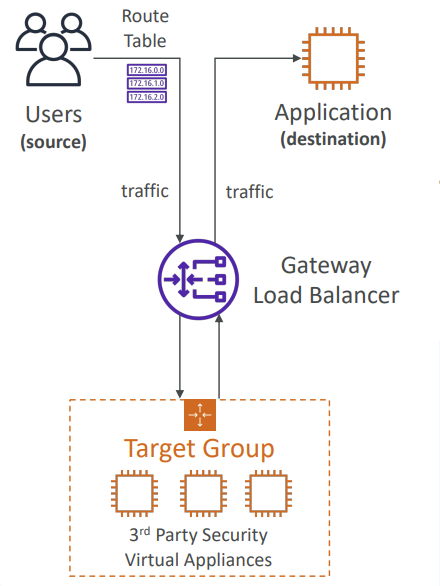
Gateway Load Balancer
Deploy, scale, and manage a fleet of 3rd party network virtual appliances in AWS.
Example: Firewalls, Intrusion Detection and Prevention Systems, Deep Packet Inspection Systems, Payload Manipulation.
Operates at Layer 3 (Network Layer) - IP Packets
Combines the following functions:
Transparent Network Gateway - single entry/exit for all traffic
Load Balancer - distributes traffic to your virtual
Uses the GENEVE protocol on port 6081
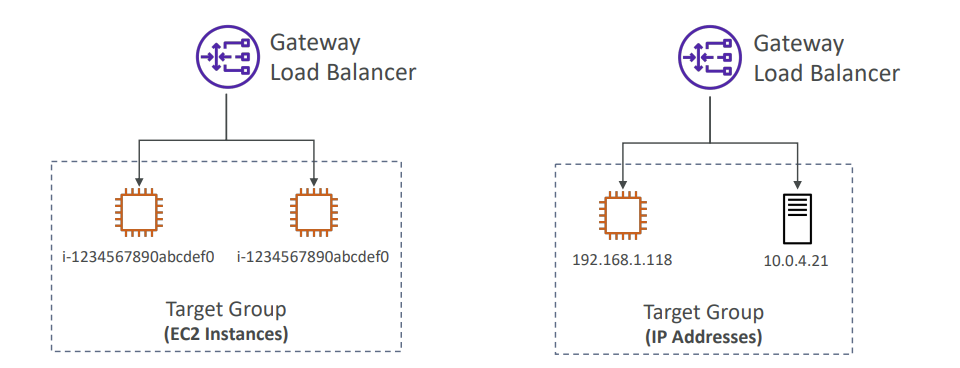
Gateway Load Balancer - Target Groups
EC2 instances
IP Addresses – must be private IPs
Sticky Sessions (Session Affinity)
It is possible to implement stickiness so that the same client is always redirected to the same instance behind a load balancer
This works for Classic Load Balancer, Application Load Balancer, and Network Load Balancer
For both CLB & ALB, the “cookie” used for stickiness has an expiration date you control
Use case: make sure the user doesn’t lose his session data
Enabling stickiness may bring imbalance to the load over the backend EC2 instances
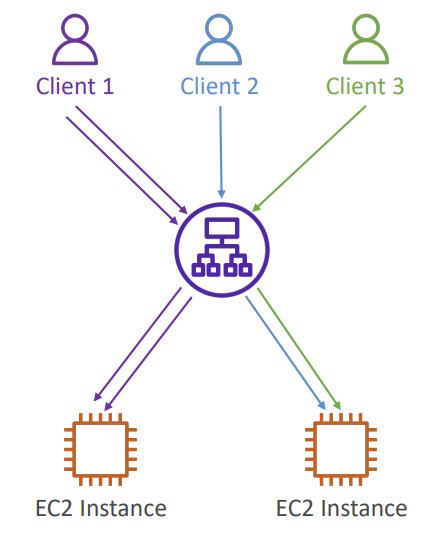
Sticky Sessions - Cookie Names
Application-based Cookies
Custom cookie
Generated by the target
Can include any custom attributes required by the application
Cookie name must be specified individually for each target group
Don’t use AWSALB, AWSALBAPP, or AWSALBTG (reserved for use by the ELB)
Application cookie
Generated by the load balancer
Cookie name is AWSALBAPP
Duration-based Cookies
Cookie generated by the load balancer
Cookie name is AWSALB for ALB, AWSELB for CLB
Cross-Zone Load Balancing
With Cross Zone Load Balancing - Each load balancer instance distributes evenly across all registered instances in all AZ
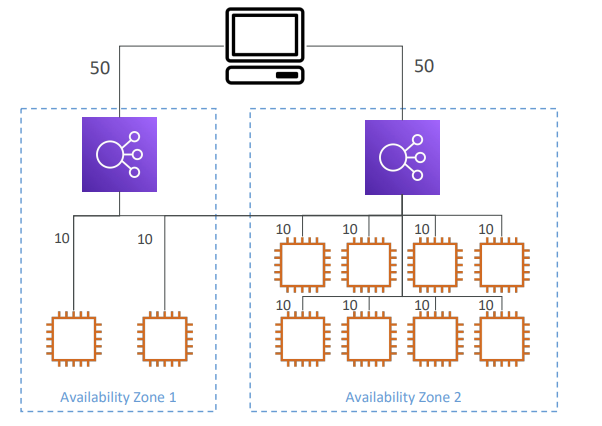
Without Cross Zone Load Balancing - Requests are distributed in the instances of the node of the Elastic Load Balancer
Application Load Balancer
Enabled by default (can be disabled at the Target Group level)
No charges for inter AZ data
Network Load Balancer & Gateway Load Balancer
Disabled by default
You pay charges for inter AZ data if enabled
Classic Load Balancer
Disabled by default
No charges for inter AZ data if enabled
SSL/TLS - Intro
An SSL Certificate allows traffic between your clients and your load balancer to be encrypted in transit (in-flight encryption)
SSL - refers to Secure Sockets Layer, used to encrypt connections
TLS - refers to Transport Layer Security, which is a newer version
Nowadays, TLS certificates are mainly used, but people still refer as SSL
Public SSL certificates are issued by Certificate Authorities (CA)
- Comodo, Symantec, GoDaddy, GlobalSign, Digicert, Letsencrypt, etc
SSL certificates have an expiration date (you set) and must be renewed
Load Balancer - SSL Certificates
The load balancer uses an X.509 certificate (SSL/TLS server certificate)
You can manage certificates using ACM (AWS Certificate Manager)
You can create upload your own certificates alternatively
HTTPS listener:
You must specify a default certificate
You can add an optional list of certs to support multiple domains
Clients can use SNI (Server Name Indication) to specify the hostname they reach
Ability to specify a security policy to support older versions of SSL / TLS (legacy clients)
SSL – Server Name Indication (SNI)
SNI solves the problem of loading multiple SSL certificates onto one web server (to serve multiple websites)
It’s a “newer” protocol, and requires the client to indicate the hostname of the target server in the initial SSL handshake
The server will then find the correct certificate, or return the default one
Note:
Only works for ALB & NLB (newer generation), CloudFront
Does not work for CLB (older gen)
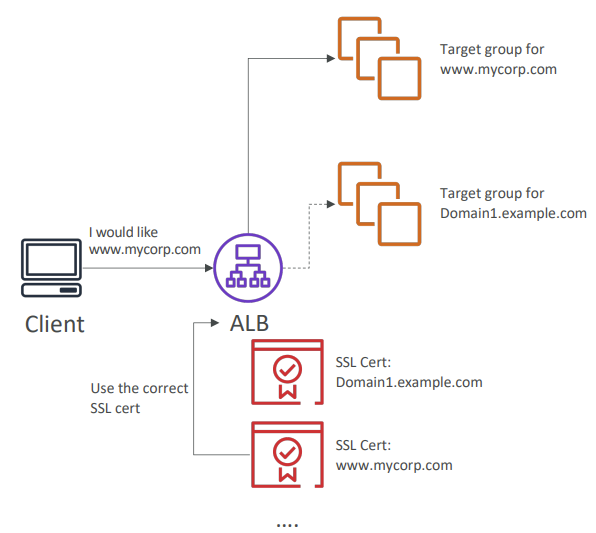
Elastic Load Balancers - SSL Certificates
Classic Load Balancer (v1)
Support only one SSL certificate
Must use multiple CLB for multiple hostname with multiple SSL certificate
Application Load Balancer (v2)
Supports multiple listeners with multiple SSL certificates
Uses Server Name Indication (SNI) to make it work
Network Load Balancer (v2)
Supports multiple listeners with multiple SSL certificates
Uses Server Name Indication (SNI) to make it work
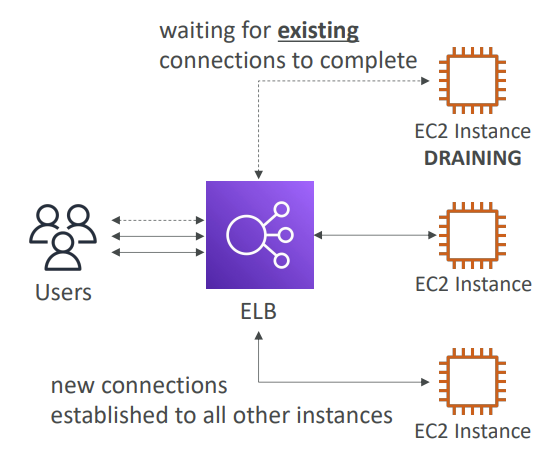
Connection Draining
Feature naming
Connection Draining - for CLB
Deregistration Delay - for ALB & NLB
Time to complete “in-flight requests” while the instance is de-registering or unhealthy
Stops sending new requests to the EC2 instance which is de-registering
Between 1 to 3600 seconds (default: 300 seconds)
Can be disabled (set value to 0)
Set to a low value if your requests are short
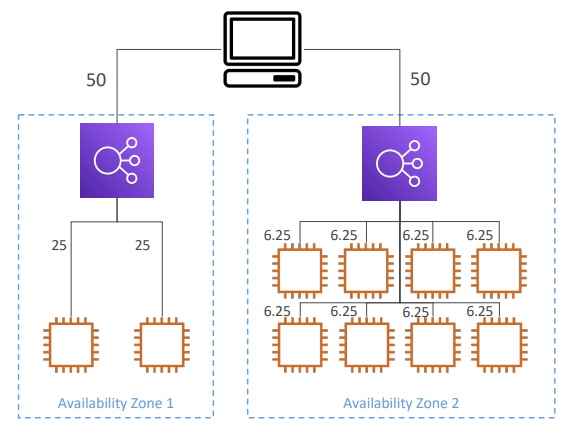
Relevant doc:
https://docs.aws.amazon.com/elasticloadbalancing/latest/userguide/index.html
https://docs.aws.amazon.com/elasticloadbalancing/latest/gateway/index.html
https://docs.aws.amazon.com/elasticloadbalancing/latest/network/index.html
https://docs.aws.amazon.com/elasticloadbalancing/latest/application/index.html
Disclaimer: This is a personal blog that might come in handy when I suffer from Dementia in future.