AWS Service - FSx
I currently work
FSx
Overview
Launch 3rd party high-performance file systems on AWS
Fully managed service
FSx for Lustre
FSx for Windows File Server
FSx for NetApp ONTAP
FSx for OpenZFS
Amazon FSx for Windows (File Server)
FSx for Windows is a fully managed Windows file system share drive
Supports SMB protocol & Windows NTFS
Microsoft Active Directory integration, ACLs, user quotas
Can be mounted on Linux EC2 instances
Supports Microsoft's Distributed File System (DFS) Namespaces (group files across multiple FS)
Scale up to 10s of GB/s, millions of IOPS, 100s PB of data
Storage Options
SSD - latency sensitive workloads ((databases, media processing, data analytics, etc)
HDD - broad spectrum of workloads (home directory, CMS, etc)
Can be accessed from your on-premises infrastructure (VPN or Direct Connect)
Can be configured to be Multi-AZ (high availability)
Data is backed-up daily to S3
Amazon FSx for Lustre
Lustre is a type of parallel distributed file system, for large-scale computing
The name Lustre is derived from
LinuxandclusterUse case:
Machine Learning, High Performance Computing (HPC)
Video Processing, Financial Modeling, Electronic Design Automation
Scales up to 100s GB/s, millions of IOPS, sub ms latencies
Storage Options
SSD - low-latency, IOPS intensive workloads, small & random file operations
HDD - throughput-intensive workloads, large & sequential file operations
Seamless integration with S3
Can “read S3” as a file system (through FSx)
Can write the output of the computations back to S3 (through FSx)
Can be used from on-premises servers (VPN or Direct Connect)
File System Deployment Options
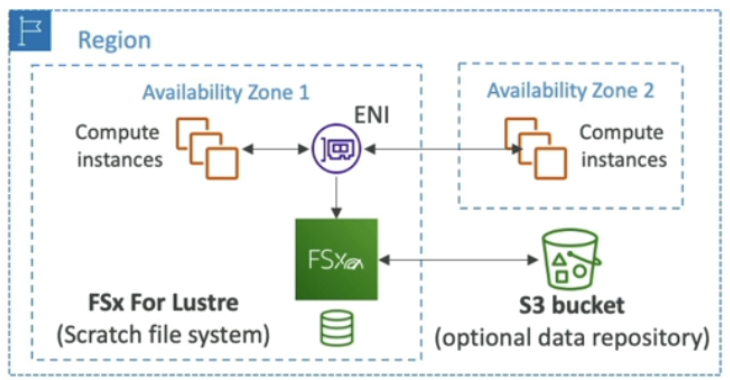
Scratch File System
Temporary storage
Data is not replicated (doesn’t persist if file server fails)
High burst (6x faster, 200MBps per TiB)
Usage: short-term processing, optimize cost
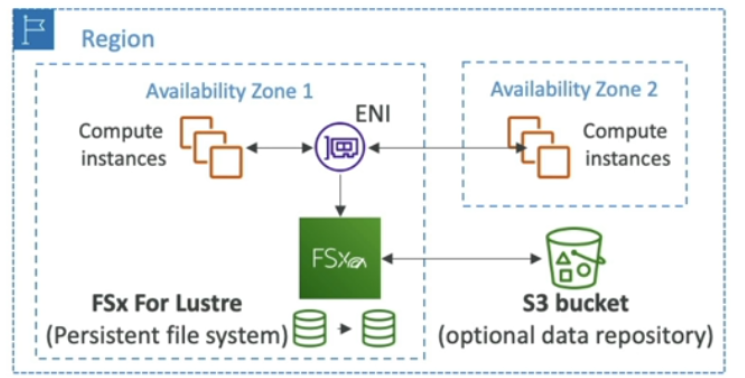
Persistent File System
Long-term storage
Data is replicated within same AZ
Replace failed files within minutes
Usage: long-term processing, sensitive data
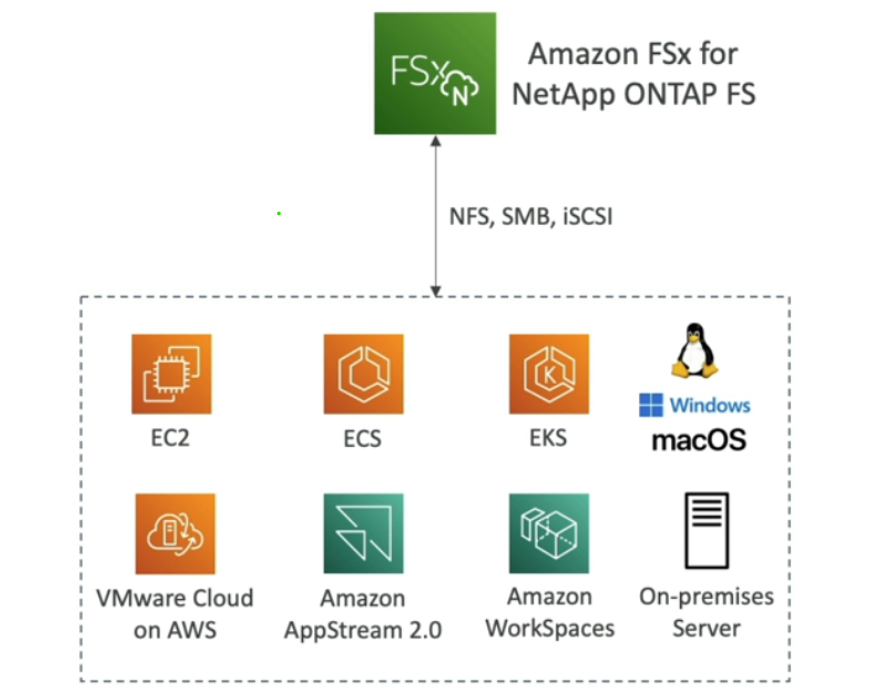
Amazon FSx for NetApp ONTAP
Managed NetApp ONTAP on AWS
File System compatible with NFS, SMB, iSCSI protocol
Move workloads running on ONTAP or NAS to AWS
Works with:
Linux, Windows, MacOS
VMware Cloud on AWS, Amazon Workspaces & AppStream 2.0
Amazon EC2, ECS and EKS
Storage shrinks or grows automatically
Snapshots, replication, low-cost, compression and data de-duplication
Point-in-time instantaneous cloning (helpful for testing new workload)
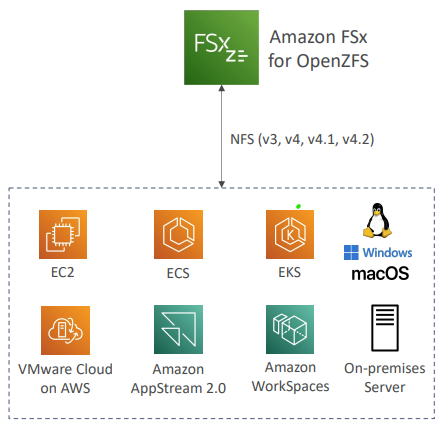
Amazon FSx for OpenZFS
Managed OpenZFS file system on AWS
File System compatible with NFS (v3, v4, v4.1, v4.2)
Move workloads running on ZFS to AWS
Works with:
Linux, Windows, MacOS
VMware Cloud on AWS, Amazon Workspaces & AppStream 2.0
Amazon EC2, ECS and EKS
Up to 1,000,000 IOPS with < 0.5ms latency
Snapshots, compression and low-cost
Point-in-time instantaneous cloning (helpful for testing new workload)
Relevant Doc:
https://docs.aws.amazon.com/fsx/latest/WindowsGuide/what-is.html
https://docs.aws.amazon.com/fsx/latest/LustreGuide/what-is.html
https://docs.aws.amazon.com/fsx/latest/ONTAPGuide/what-is-fsx-ontap.html
https://docs.aws.amazon.com/fsx/latest/OpenZFSGuide/what-is-fsx.html
Disclaimer: This is a personal blog that might come in handy when I suffer from Dementia in future.