AWS Service - S3
I currently work
S3:
Buckets
Amazon S3 allows people to store objects (files) in “buckets” (directories)
Buckets must have a globally unique name (across all regions all accounts)
Buckets are defined at the region level
Note: S3 looks like a global service but buckets are created in a region
Naming convention
No uppercase, No underscore
3-63 characters long
Not an IP
Must start with lowercase letter or number
Must NOT start with the prefix
xn--Must NOT end with the suffix
-s3aliasDoc link - Naming convention
Objects
Objects (files) have a Key
The key is the full path:
s3://my-bucket/my_file.txt
s3://my-bucket/my_folder1/another_folder/my_file.txt
The key is composed of prefix + object name
s3://my-bucket/my_folder1/another_folder/my_file.txt
Here:
Bucket is
my-bucketPrefix is
my_folder1/another_folderObject is
my_file.txt
There’s no concept of “directories” within buckets
Just keys with very long names that contain slashes (“/”)
Object values are the content of the body:
Max object Size is 5TB
If uploading more than 5GB, must use “multi-part upload”
Metadata (list of text key / value pairs - system or user metadata)
Tags (Unicode key / value pair - up to 10) - useful for security / lifecycle
Version ID (if versioning is enabled)
Security
User-Based
Through IAM policies
- which API calls should be allowed for a specific user from IAM
Resource-Based
Bucket Policies - bucket wide rules from the S3 console - allows cross account
Object Access Control List (ACL) - finer grain - can be disabled
Bucket Access Control List (ACL) - less common - can be disabled
Encryption
- encrypt objects in Amazon S3 using encryption keys
S3 Bucket Policies
JSON based policies - looks similar to IAM policies
Usecase:
Grant public access to the bucket
Force objects to be encrypted at upload
Grant access to another account (Cross Account)
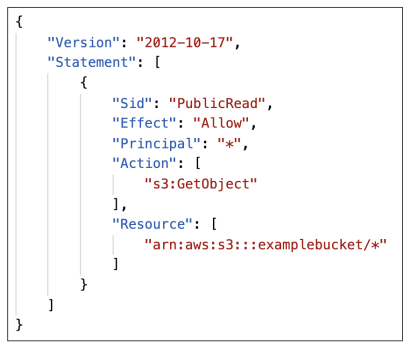
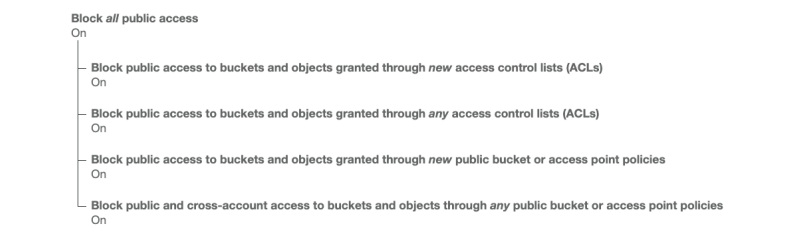
- Bucket settings for Block Public Access
Static Website Hosting
S3 can host static websites and have them accessible on the Internet
The website URL will be either of the below depending on the region
http://bucket-name.s3-website-aws-region.amazonaws.com
http://bucket-name.s3-website.aws-region.amazonaws.com
the only diff is
website-andwebsite.in the above two pattern
Versioning
You can version your files in Amazon S3
It is enabled at the bucket level
Same key overwrite will change the “version”: 1, 2, 3, etc
It is best practice to version your buckets
Protect against unintended deletes (ability to restore a version)
Roll back to previous version
Note:
Any file that is not versioned prior to enabling versioning will have version
nullSuspending versioning does not delete the previous versions
Replication
Must enable Versioning in source and destination buckets
CRR - Cross-Region Replication
SRR - Same-Region Replication
Buckets can be in different AWS accounts
Copying is asynchronous
Must give proper IAM permissions to S3
Usecase:
CRR - compliance, lower latency access, replication across account
SRR - log aggregation, live replication between envs
After you enable Replication, only new objects are replicated
Optionally, you can replicate existing objects using S3 Batch Replication
- Replicates existing objects and objects that failed replication
For
DeleteoperationsWe could replicate delete markers from source to target (optional setting)
Deletions with a version ID are not replicated (to avoid malicious deletes)
There is no “chaining” of replication
If bucket 1 has replication into bucket 2, which has replication into bucket 3
Then objects created in bucket 1 are not replicated to bucket 3
Durability and Availability
Durability:
High durability (99.999999999%, 11 9’s) of objects across multiple AZ
If you store 10,000,000 objects with Amazon S3, you can on average expect to incur a loss of a single object once every 10,000 years
Same for all storage classes
Availability:
Measures how readily available a service is
Varies depending on storage class
Example: S3 standard has 99.99% availability = not available 53 minutes a year
Storage Classes
Amazon S3 Standard - General Purpose
Amazon S3 Standard-Infrequent Access (IA)
Amazon S3 One Zone-Infrequent Access
Amazon S3 Glacier Instant Retrieval
Amazon S3 Glacier Flexible Retrieval
Amazon S3 Glacier Deep Archive
Amazon S3 Intelligent Tiering
S3 Standard - General Purpose
99.99% Availability
Used for frequently accessed data
Low latency and high throughput
Sustain 2 concurrent facility failures
Use Cases: Big Data analytics, mobile & gaming applications, content distribution
S3 Storage Classes - Infrequent Access
For data that is less frequently accessed, but requires rapid access when needed
Lower cost than S3 Standard
Amazon S3 Standard-Infrequent Access (S3 Standard-IA)
99.9% Availability
Use cases: Disaster Recovery, backups
Amazon S3 One Zone-Infrequent Access (S3 One Zone-IA)
High durability (99.999999999%) in a single AZ; data lost when AZ is destroyed
99.5% Availability
Use Cases: Storing secondary backup copies of on-premises data, or data you can recreate
S3 Glacier Storage Classes
Low-cost object storage meant for archiving / backup
Pricing: price for storage + object retrieval cost
Amazon S3 Glacier Instant Retrieval
Millisecond retrieval, great for data accessed once a quarter
Minimum storage duration of 90 days
Amazon S3 Glacier Flexible Retrieval
Expedited (1 to 5 minutes), Standard (3 to 5 hours), Bulk (5 to 12 hours) - free
Minimum storage duration of 90 days
Amazon S3 Glacier Deep Archive - for long term storage
Standard (12 hours), Bulk (48 hours)
Minimum storage duration of 180 days
S3 Intelligent-Tiering
Moves objects automatically between Access Tiers based on usage
Small monthly monitoring and auto-tiering fee
There are no retrieval charges in S3 Intelligent-Tiering
Frequent Access tier (automatic): default tier
Infrequent Access tier (automatic): objects not accessed for 30 days
Archive Instant Access tier (automatic): objects not accessed for 90 days
Archive Access tier (optional): configurable from 90 days to 700+ days
Deep Archive Access tier (optional): config. from 180 days to 700+ days
S3 Storage Classes Comparison
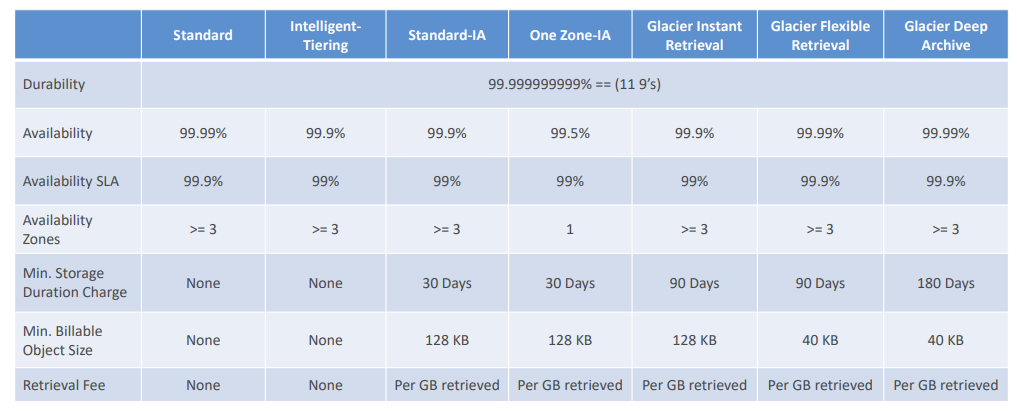
- S3 Storage Classes - Price Comparison
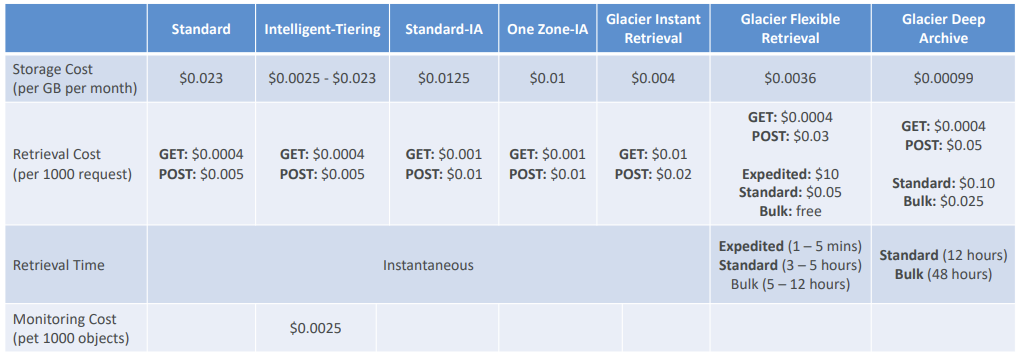
Moving between Storage Classes
You can transition objects between storage classes
For infrequently accessed object, move them to Standard IA
For archive objects that you don’t need fast access to, move them to Glacier or Glacier Deep Archive
Moving objects can be automated using a Lifecycle Rules
Lifecycle Rules
Transition Actions
Configure objects to transition to another storage class
Move objects to Standard IA class 60 days after creation
Move to Glacier for archiving after 6 months
Expiration actions
Configure objects to delete after some time
Access log files can be set to delete after a 365 days
Can be used to delete old versions of files (if versioning is enabled)
Can be used to delete incomplete Multi-Part uploads
Rules can be created for a certain prefix, certain objects Tags
Storage Class Analysis
Help you decide when to transition objects to the right storage class
Recommendations for Standard and Standard IA
- Does not work for One-Zone IA or Glacier
Report is updated daily
24 to 48 hours to start seeing data analysis
Requester Pays
In general, bucket owners pay for all Amazon S3 storage and data transfer costs associated with their bucket
With Requester Pays buckets, the requester instead of the bucket owner pays the cost of the request and the data download from the bucket
Helpful when you want to share large datasets with other accounts
The requester must be authenticated in AWS (cannot be anonymous)
Event Notifications
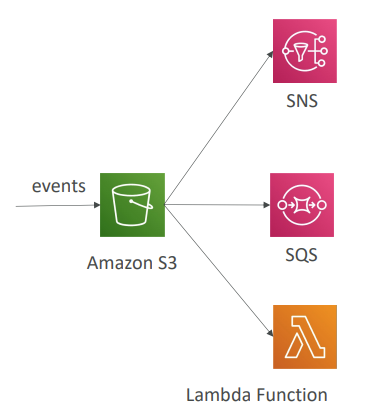
Based on S3 events downstream services could be triggered
S3:ObjectCreated, S3:ObjectRemoved, S3:ObjectRestore, S3:Replication
Can create as many “S3 events” as desired
S3 event notifications typically deliver events in seconds but can sometimes take a minute or longer
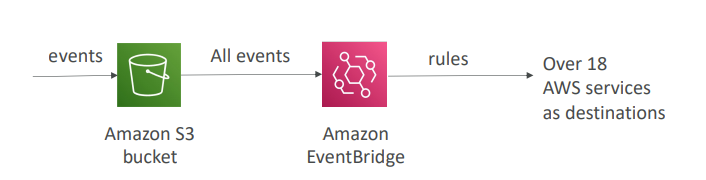
S3 Event Notifications with Amazon EventBridge
Advanced filtering options with JSON rules
Multiple Destinations - Lambda, SNS, Step function, etc
EventBridge Capabilities - Archive, Replay Events, Reliable delivery
Baseline Performance
Amazon S3 automatically scales to high request rates, latency 100-200 ms
We could achieve at least 3,500 PUT/COPY/POST/DELETE or 5,500 GET/HEAD requests per second per prefix in a bucket
There are no limits to the number of prefixes in a bucket
Tip: Spreading reads across prefix evenly could give higher reads per second
Ex: Prefix1 ; Prefix 2
So we basically get 2 × 5500 = 11,000 api per second indirectly by abusing the fact that there are no limits to no of prefix and per prefix we could go as high as 5,500 per sec
S3 Performance
Multi-Part upload
Recommended for files > 100MB, must use for files > 5GB
Can help parallelize uploads (speed up transfers)
S3 Transfer Acceleration
Increase transfer speed by transferring file to an AWS edge location which will forward the data to the S3 bucket in the target region
Compatible with multi-part upload
S3 Byte-Range Fetches
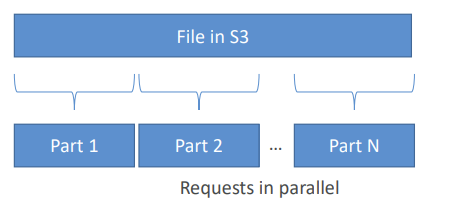
Parallelize GETs by requesting specific byte ranges
Better resilience in case of failures
Can be used to speed up downloads
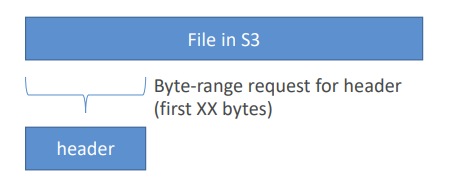
- Can be used to retrieve only partial data (for example the head of a file)
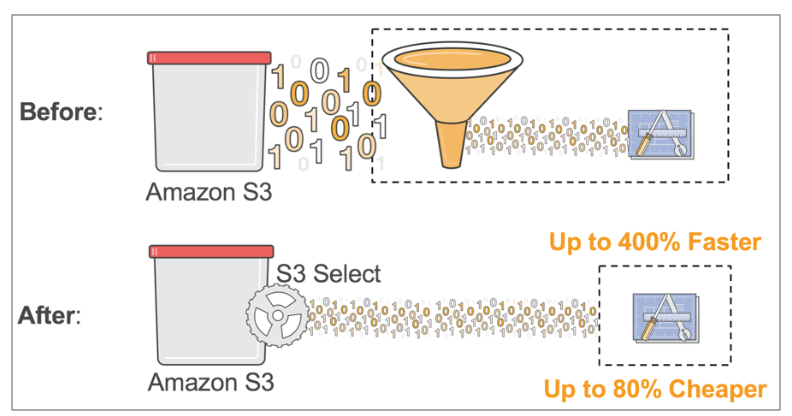
S3 Select & Glacier Select
Retrieve less data using SQL by performing server-side filtering
Can filter by rows & columns (simple SQL statements)
Less network transfer, less CPU cost client-side
S3 Batch Operations
Perform bulk operations on existing S3 objects with a single request, example:
Modify object metadata and properties
Copy objects between S3 buckets
Encrypt un-encrypted objects
Modify ACLs, tags
Restore objects from S3 Glacier
Invoke Lambda function to perform custom action on each object
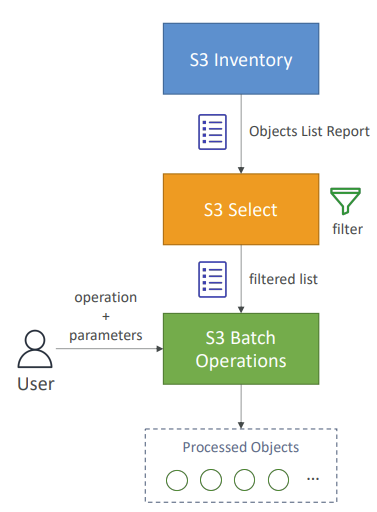
A job consists of a list of objects, the action to perform, and optional parameters
S3 Batch Operations manages retries, tracks progress, sends completion notifications, generate reports
You can use S3 Inventory to get object list and use S3 Select to filter your objects
S3 Object Encryption
Server-Side Encryption with Amazon S3-Managed Keys (SSE-S3)
Server-Side Encryption with KMS Keys stored in AWS KMS (SSE-KMS)
Server-Side Encryption with Customer-Provided Keys (SSE-C)
Client-Side Encryption
S3 Encryption - SSE -S3
Encryption using keys handled, managed, and owned by AWS
Object is encrypted server-side
Encryption type is AES-256
Must set header "x-amz-server-side-encryption": "AES256”
Enabled by default for new buckets & new objects
S3 Encryption - SSE-KMS
Encryption using keys handled and managed by AWS KMS (Key Management Service)
Better user control and audit key usage tracking using CloudTrail
Object is encrypted server side
Must set header "x-amz-server-side-encryption": "aws:kms"
Beware there is quota limit to KMS API rates
Amazon S3 Encryption - SSE-C
Server-Side Encryption using keys fully managed by the customer outside of AWS
Amazon S3 does not store the encryption key you provide
HTTPS must be used
Encryption key must provided in HTTP headers, for every HTTP request made
Amazon S3 Encryption - Client-Side Encryption
Use client libraries such as Amazon S3 Client-Side Encryption Library
Clients must encrypt data themselves before sending to Amazon S3
Clients must decrypt data themselves when retrieving from Amazon S3
Customer fully manages the keys and encryption cycle
Encryption in transit (SSL/TLS)
Encryption in flight is also called SSL/TLS
Amazon S3 exposes two endpoints:
HTTP Endpoint - non encrypted
HTTPS Endpoint - encryption in flight
HTTPS is mandatory for SSE-C
Most clients would use the HTTPS endpoint by default
We could force HTTPS by adding those condition in bucket policy
CORS
CORS - Cross-Origin Resource Sharing
Origin = scheme (protocol) + host (domain) + port
ex: https://www.example.com
Protocol - HTTPS
Domain - www.example.com
Port - HTTPS (443) ; HTTP (80)
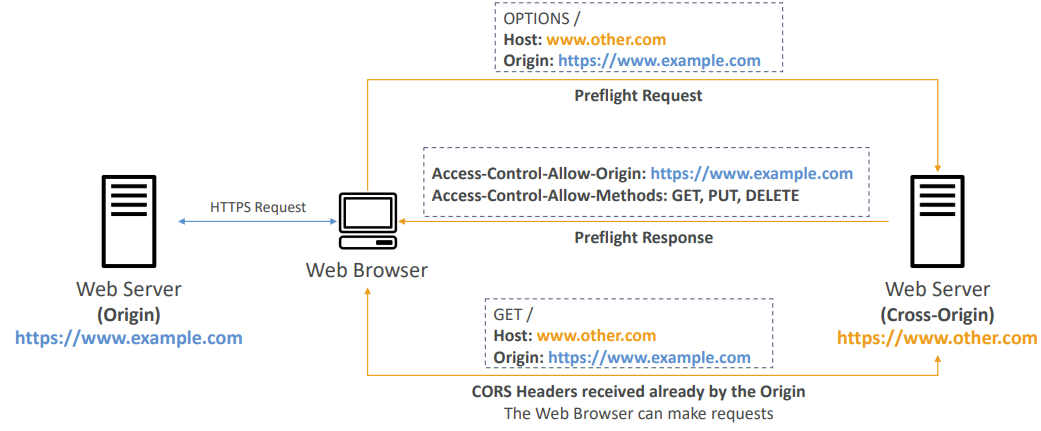
Web Browser based mechanism to allow requests to other origins while visiting the main origin
Same origin:
http://example.com/page1andhttp://example.com/page2Different origins:
http://www.example.comandhttp://other.example.comThe requests won’t be fulfilled unless the other origin allows for the requests, using CORS Headers (example: Access-Control-Allow-Origin)
If a client makes a cross-origin request on our S3 bucket, we need to enable the correct CORS headers
S3 - MFA Delete
MFA (Multi-Factor Authentication) – force users to generate a code on a device (usually a mobile phone or hardware) before doing important operations on S3
MFA will be required to:
Permanently delete an object version
Suspend Versioning on the bucket
MFA won’t be required to:
Enable Versioning
List deleted versions
To use MFA Delete, Versioning must be enabled on the bucke
Only the bucket owner (root account) can enable/disable MFA Delete
S3 Access Logs
For audit purpose, you may want to log all access to S3 buckets
Any request made to S3, from any account, authorized or denied, will be logged into another S3 bucket
That data can be analyzed using data analysis tools
The target logging bucket must be in the same AWS region
Do not set your logging bucket to be the monitored bucket
It will create a logging loop, and your bucket will grow exponentially - you will pay the price for your negligence or some bad screwing you up
S3 - Pre-Signed URLs
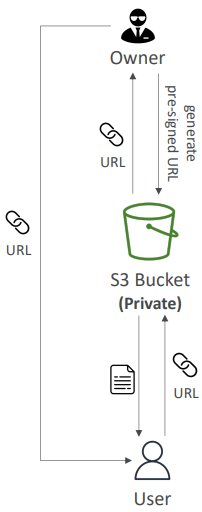
Generate pre-signed URLs using the S3 Console, AWS CLI or SDK
URL Expiration
S3 Console - 1 min up to 720 mins (12 hours)
AWS CLI - configure expiration with --expires-in parameter in seconds (default 3600 secs, max. 604800 secs ~ 168 hours)
Users given a pre-signed URL inherit the permissions of the user that generated the URL for GET / PUT
Examples:
Allow only logged-in users to download a premium video from your S3 bucket
Allow an ever-changing list of users to download files by generating URLs dynamically
Allow temporarily a user to upload a file to a precise location in your S3 bucket
S3 Glacier Vault Lock
Adopt a WORM (Write Once Read Many) model
Create a Vault Lock Policy
Lock the policy for future edits - can no longer be changed or deleted
Helpful for compliance and data retention
S3 Object Lock
Versioning must be enabled
Adopt a WORM (Write Once Read Many) model
Block an object version deletion for a specified amount of time
Retention mode - Compliance:
Object versions can't be overwritten or deleted by any user, including the root user
Objects retention modes can't be changed, and retention periods can't be shortened
Retention mode - Governance:
Most users can't overwrite or delete an object version or alter its lock settings
Some users have special permissions to change the retention or delete the object
Retention Period: protect the object for a fixed period, it can be extended
Legal Hold:
Protect the object indefinitely, independent from retention period
Can be freely placed and removed using the s3:PutObjectLegalHold IAM permission
S3 - Access Points
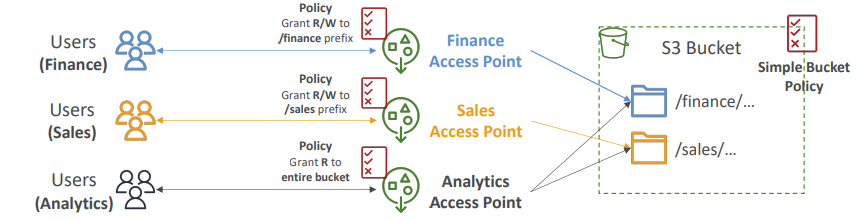
Access Points simplify security management for S3 Buckets
Each Access Point has
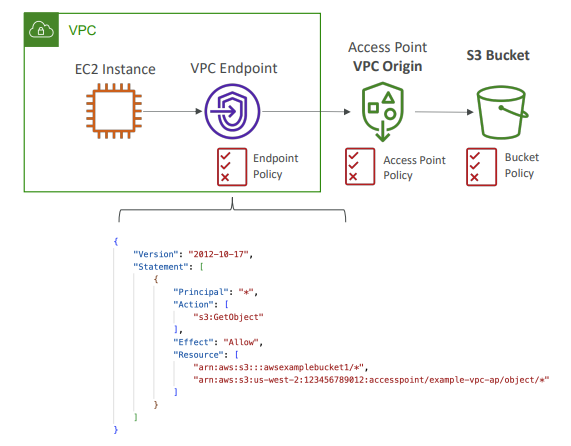
Own DNS name (Internet Origin or VPC Origin)
An access point policy similar to bucket policy to manage security at scale
We can define the access point to be accessible only from within the VPC
You must create a VPC Endpoint to access the Access Point (Gateway or Interface Endpoint)
The VPC Endpoint Policy must allow access to the target bucket and Access Point
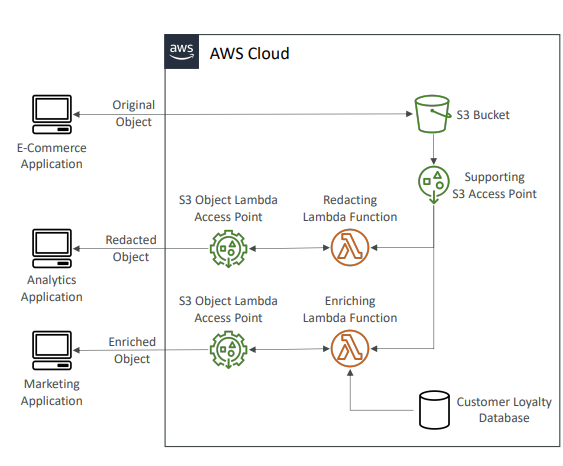
S3 Object Lambda
Use AWS Lambda Functions to change the object before it is retrieved by the caller application
Only one S3 bucket is needed, on top of which we create S3 Access Point and S3 Object Lambda Acces
Use Case:
Redacting personally identifiable information for analytics or non- production environment
Converting across data formats, such as converting XML to JSON
Resizing and watermarking images on the fly using caller-specific details, such as the user who requested the object
Relevant Doc:
https://docs.aws.amazon.com/AmazonS3/latest/userguide/Welcome.html
Disclaimer: This is a personal blog that might come in handy when I suffer from Dementia in future